Text alerts
TeleServ is software for limousine and chauffeur companies. When a call needs attention, TeleServ can send a short work alert by text to the managers and staff of the company that uses it. Texts are optional, for work only, and never marketing.
Who receives them
Only employees of businesses that use TeleServ, after they sign in to their own TeleServ account and choose to receive texts. We never text the public or a business's customers through this program.
How to sign up
- Your company's TeleServ admin invites you, and you sign in to TeleServ.
- Open Your account, then Profile.
- Enter your mobile number.
- Tick Text me work alerts from TeleServ. The box is unticked until you tick it.
- TeleServ sends one text to confirm you are signed up.
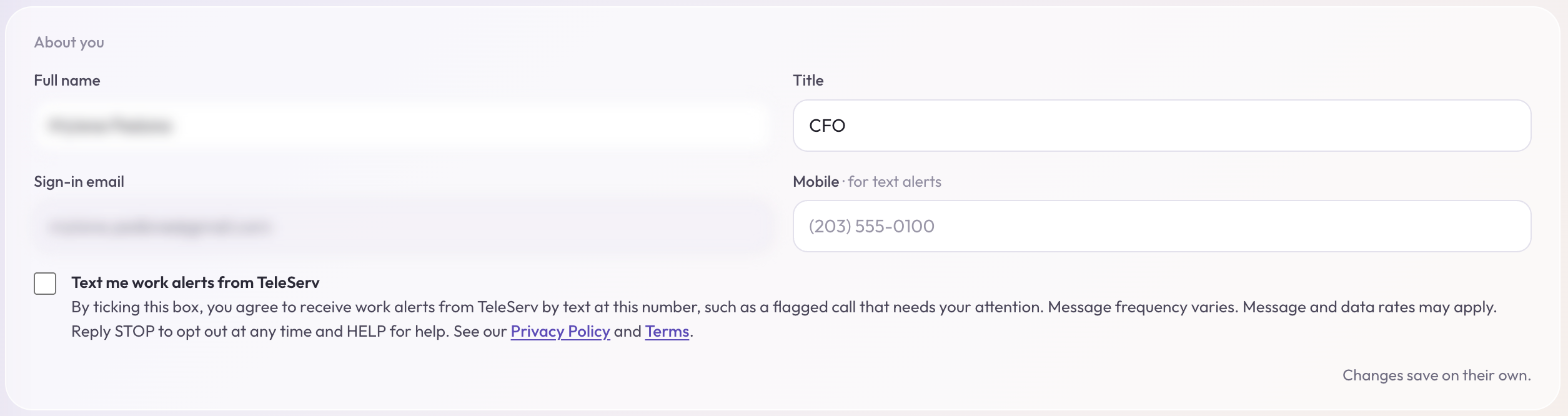
The words beside the box: Text me work alerts from TeleServ. By ticking this box, you agree to receive work alerts from TeleServ by text at this number, such as a flagged call that needs your attention. Message frequency varies. Message and data rates may apply. Reply STOP to opt out at any time and HELP for help. See our Privacy Policy and Terms.
What a text looks like
The details
- How often. It depends on your company's calls, usually a few texts a day or fewer.
- Cost. Message and data rates may apply, per your mobile carrier.
- Stop any time. Reply STOP to any text, or untick the box in your profile.
- Help. Reply HELP, or write to support@teleserv.ai.
- Your number stays private. We do not sell or share your mobile number or your consent with anyone for marketing. Twilio delivers the texts for us and uses your number only for that.
Read the Privacy Policy and Terms for the full details.
Carriers are not liable for delayed or undelivered messages.